I’ve recently done this Linux Foundation/OpenSSF online course on Developing Secure Software. It was good, I can recommend it! One thing that struck me, was how many xkcd comics the course used for illustrating key concepts. I remembered most of them, and I’ve used some of them in my own presentations in the past.
The comics used in the course were #2347, #1354, #327, #538, #221, and #2261. Funny how every sub-culture has these recurring themes that you encounter over and over again. Always gives me this feeling of nostalgia – and so did many of the more serious contents of the course.
The Sandboxing Cycle
Today I want to talk about the subject of one xkcd comic that didn’t show up in that course. It was out of scope, but it’s relevant for information security in general. In fact, I think that it describes about 50% of what the software industry has been doing for the past several decades – Sandboxing:
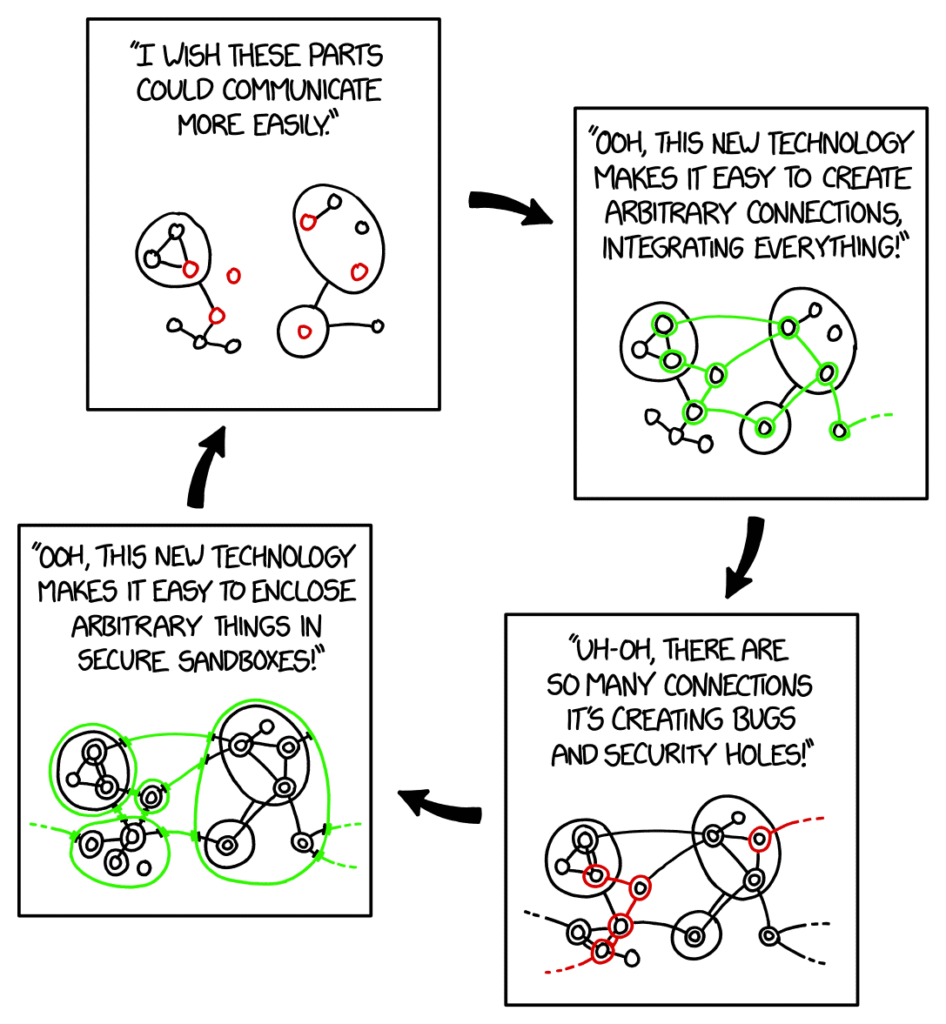
Sure, there’s always some other hype, like LLMs. But under the hood, it’s all about breaking up things and plugging them together again. And finding the right granularity that keeps everything manageable. And secure?
Sandbox All The Things!
Well, security has always been an important aspect of computing to me. So let’s talk about this one panel from the comic:
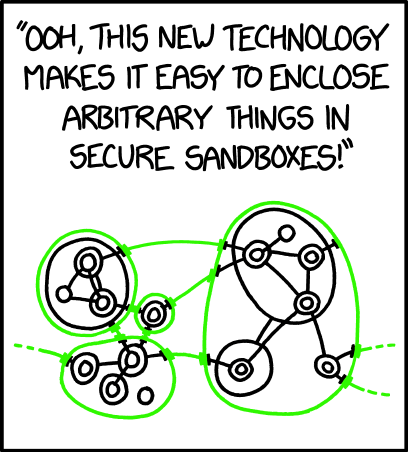
To be clear, this post is not about sandboxing in general. It’s just about my personal move from one sandboxing tool (Vagrant) to another (Incus). And it’s focused on a desktop scenario. Before diving into my scenario, let’s have a quick look at the bigger picture.
There are many different sandboxing technologies out there. Historically, half a century ago, concepts like process isolation and multi-user operating systems (OS) have been early steps towards sandboxing. Today, the most important sandboxing concepts are containers and virtual machines:
- Containers:
These use containerization techniques provided by an OS to isolate processes even further. Software running inside a container is isolated from the underlying system and other containers.
A container has restricted access to underlying resources, like file-systems and networking. However, it can interact with the outside world through well-defined interfaces.
In the Linux world, the kernel provides a plethora of mechanisms that can enforce container isolation. Tools like Docker, Podman, or runc leverage these kernel mechanisms to containerize workloads.
(To learn how these mechanisms work, see Michael Kerrisk‘s recent workshop on “Linux Containers In (Less Than) 100 Lines of Shell”.) - Virtual Machines (VM):
These use virtualization techniques that can emulate a full computer and associated hardware. The latter includes virtual disks, network interfaces, output devices, etc. Inside a VM, a fully independent OS can be run (which can be different from the OS of the underlying host).
Software running inside a VM has no direct access to the underlying host (the so-called hypervisor). However, a VM can interact with the outside world through well-defined interfaces.
In the Linux world, tools like Qemu/KVM or VirtualBox leverage different virtualization mechanisms to run and manage VMs.
Both of the above are tremendously popular for running server workloads in data centers. Often they are combined, e.g. by running several containers inside a VM. However, this post focuses on their use on desktop computers…
Why Sandboxing Desktop Software?
Why would I want to use sandboxing on my laptop? After, all this is not a shared device. It belongs to me, me alone!
Well, there’s a shitload of software that I want to run. This may include software from sources that I trust less than others. When I develop software myself, I’m pulling in heaps of 3rd-party dependencies. Same as almost every other software developer. That’s why software supply-chain issues are an important threat nowadays. Be they caused by accidental vulnerabilities or hostile takeover of whole software projects.
Even when not developing, I want to try out new software from time to time. It’s good to have an approach for doing this in a controlled environment. Sometimes it’s just a matter of convenience. The software that I want to test isn’t necessarily available in my Linux distro‘s package manager. I may want to pull it in through a different distro. Or, install it manually, without wasting to much thought about a clean and secure setup.
Also, I generally try to enforce an open-source-only policy on my primary devices. But there is proprietary software that I want to have at hand from time to time.
So long Vagrant!
Until about 2 years ago, I had been using Vagrant to fulfill my desktop sandboxing needs. Vagrant supports both containers and VMs through different “Providers”, though I’ve only ever used it for VirtualBox VMs.
Vagrant used to be quite popular and it came alongside a huge catalog of VM images (so called “Vagrant Boxes”). However, they changed their licensing model in 2023, and it looks like the “community edition” has received diminished support in recent years.
Vagrant has been doing a good job, as long as it lasted. But eventually it was time to move on to something different…
Welcome Incus!
When looking for a replacement for Vagrant, I stumbled across Incus and decided to give it a go. Incus is not a drop-in replacement for Vagrant. (If you want something closer to that, have a look at the Incant project, which builds on top of Incus.)
This meant that my migration involved some of manual work and was painful at times. However, eventually the all the work paid off and I’m currently running more than a dozen Incus instances on my laptop (not necessarily all at the same time).
Here’s some reasons why I decided to use Incus and why I’m happy with it:
- It has a clean and intuitive CLI.
- It support both container and VM instances.
- It uses the mature Qemu/KVM stack for VM instances.
- It uses mature LXC technology for container instances.
- It supports so called “system containers”, which can be more heavyweight than the typical “application containers” from the Docker world.
- Thus it allows managing payloads inside both containers and VMs in a similar manner. (I’m using Ansible for this part.)
- It comes with its own image server, which hosts disk images for many popular Linux distributions. (You can also create images yourself, starting from OS install media.)
- Most of its images come in a flavor that supports cloud-init.
(This allows me to reuse bootstrapping code between Incus instances, Hyperscaler instances, and even Raspberry Pis.) - It allows unprivileged users to manage their own instances in user-confined projects.
- It comes alongside an OpenTofu/Terraform Incus Provider.
(This allows me to reuse some infrastructure code between Hyperscaler instances and Incus instances.)
There are other noteworthy Incus features (e.g. profiles or clustering) that have been less relevant to me so far. I should also mention that Incus is a fork of LXD – not sure how far these two projects have drifted apart over the past few years.
Learning Incus from Experience
As mentioned earlier, my journey to Incus was not free of pain. I guess every new, complex technology that you encounter requires patience and dedication. I do not remember all the hurdles that I had to overcome. Many of them were rooted in my inexperience with LXC and Qemu, not in Incus itself.
Here are some pain points that I’ve overcome:
- The Incus project was still fairly new when I started using it about 2 years ago. I was running Incus on a non-LTS version of Ubuntu at that time. Members of the Incus community told me that they focus on compatibility with Ubuntu LTS, and that glitches are to be expected on interim releases. Currently, I’m on Ubuntu 26.04 LTS and Incus works just fine.
- I wanted to mount directories from my host into Incus containers and VMs. Initially I had some trouble getting the
idmapconfiguration right. But with help from the Incus community I’ve been able to resolve this. - I wasn’t able to resolve all of my mount problems at that time. Some of my mounts were causing trouble in VMs in my user-confined Incus projects.
As a workaround, I’ve been running two VMs as root in Incus’ default project. This was not ideal from a sandboxing perspective, because the root user inside the VM could tinker with filesystem permissions without restrictions. In particular, they could setsuidflags on executable files, which could allow users on the host to elevate their privileges.
Well, this was all on my personal laptop, so I tolerated the flaw. About a month ago, I revisited this topic. I’ve succeeded moving all my VMs to my user-confined Incus project. Here, Incus enforces suitable filesystem restrictions out-of-the-box.
So, host mounts work as expected now. Not sure, if this is due to a newer Incus version or due to configuration adjustments that I’ve made over time. - Originally, I wanted to run individual desktop applications inside dedicated Incus containers. Even full-blown “system containers” are much more light-weight than VMs. I tried following a guide on Incus / LXD profile for GUI apps and got the basics working.
However, running complex GUI applications this way (e.g. VS Code) felt kind of glitchy. I do not remember how exactly, and it may have been caused by bugs in my own configuration.
Eventually, I pivoted to having a couple of VMs with several related desktop applications inside each. These consume more resources and take longer to boot, but the general user experience is fine. By default, Incus uses SPICE to connect to the graphics outputs of a VM. I couldn’t notice any latency, even without advanced GPU configuration for such VMs.
Now that my other Incus troubles are solved, I might give desktop apps in dedicated containers another go…
Other challenges that I’ve encountered on this journey were not caused by Incus at all:
- My Laptop comes with a dual-GPU setup, but I’m mostly using the Intel GPU that is co-located with my CPU. I’ve managed to pass-through my entire dedicated Nvidia GPU into an Incus VM an run LM Studio with GPU support in there.
The main challenge was that something on the host was hogging the dedicated GPU without actually using it. Once I resolved this, Incus handled the pass-through just fine. Incus unloads the host GPU driver when it starts the VM and reloads it when it stops the VM. (Having some GPU driver active at all times turned out to be important: without it, my Nvidia GPU does not do any power-management and runs hot.) - My Laptop came with a mandatory M$ Windows license, which I had never used. Earlier this year I tried installing Windows in an Incus VM. This was surprisingly easy following instruction from a blog post.
The main challenges were on the Windows side: Had to figure out where to find my Windows license key (to my surprise this can be found in/sys/firmware/acpi/tables/MSDM) and convince the Windows installer to continue without an M$ online account (press Shift-F10 to drop to a command prompt, then runstart ms-cxh:localonly).
Altogether, my Incus setup is working pretty well now. This gives me the freedom to spin up instances quickly, whenever I need robust sandboxing.
Any Alternatives?
Of course, Incus is not the only tool that could address my personal sandboxing needs. Here’s some others:
- Some package managers (and associated tooling) may provide more convenient means for sandboxing desktop applications. Similar to how mobile OS enforce restrictions on mobile apps and ask users for explicit permissions. Snap and Flatpack bring such concepts to the Linux desktop.
- When it comes to VMs, libvirt can provide unified tooling around various virtualization technologies. While it may be too complex for my needs, there are more convenient solutions built on to of it.
- When it comes to containers, systemd (which is running most modern Linux systems anyway) can be used to configure kernel isolation mechanisms on a per-unit basis.
- Podman makes it easy to manage containers as systemd units. (This can be used to cut out more heavyweight middlemen, like Docker or Kubernetes.)
- NixOS (one of my current favorites) comes with support for managing containers and VMs. Just look at all the different containers.* and virtualization.* options. Its declarative configuration approach can be used to manage both instances and the workloads that they are running.
- Qubes OS puts virtualization (with Xen) at the center of a whole OS.
- Light-weight process sandboxing tools like nono or sandlock leverage LSM and follow a simple deny-all approach: Do not allow anything, unless it is explicitly allowed by a specific policy.
This is by no means a comprehensive list, just a personal selection. I haven’t looked at all of the above technologies in detail yet. But there is one thing that I know for sure: I’ll first try them inside an Incus instance.